
Development — Work In Progress
Want to help test MaLa v2.0? Beta testing is open to cabinet owners with a working MaLa setup, and new testers are being added gradually.
- Email malatesters@malafe.net — or reply on the MaLa v2.0 thread on the BYOAC Forum, if it’s up.
- Include your setup: Windows version, emulators, and any LED or LCD hardware.
- You’ll get a reply with the details.
MaLa v2.0 is for Windows 7, 10 and 11. On Windows XP or older, please use MaLa v1.9.
MaLa v2.0 — Coming
That’s why beta testing matters so much for this version: the more real cabinets it runs on, the more solid that foundation will be.
- Portable install — save MaLa's paths relative to its own folder (Options → Backup → Paths) so the whole MaLa folder can be moved to another folder or drive and keep working. Your settings are backed up first, and you can switch back to full paths at any time. Paths on other drives are left as they are, and MaLa 1.x can't read relative paths.
- Choose your look — pick a visual style for MaLa's settings screens and dialogs: Windows 10 Dark by default, with Auric, Silver and Cobalt XEMedia to choose from, or switch styles off for the classic look. You'll find it under Options → GUI → Display → Misc (“Use modern VCL Style”). Changes apply after a restart and need Windows 10 or 11. Your game layouts are never restyled.
- Rotate in one step — right-click, then Change orientation, to jump straight to 0°, 90°, 180° or 270°, as well as Switch or Flip.
- Better music — a rebuilt audio engine with a new scrub bar and playlist export. Track names come from ID3 tags, fades are on by default, and unsupported files are skipped instead of stalling playback.
- Video that just plays — the new FFVCL video engine plays MP4 and other modern formats out of the box, with no codec packs or DirectShow hunting required.
- Animated GIFs play smoothly as layout videos, and can now also be used as game preview videos — name the GIF after the ROM and put it in your videos folder, and MaLa uses it when a game has no AVI or MP4. A GIF is drawn as a solid rectangle, as in 1.x, so design a GIF background to match your layout.
- Emulator presets — many more built-in emulator presets added, so setting up a new emulator is now just a couple of clicks.
- Plugin manager — Options → Event Plugins lists every plugin, lets you untick one to disable it, and shows which events each one supports. The updated plugin API adds an improved event system, with SDK examples for C++, C#, Delphi and Rust.
- Redesigned LED editor — click a row to light that LED, assign functions inline, and use All On / All Off. If a configured LED or LCD board isn't connected, you can clear or reassign its slot without plugging the original back in. Native support for IOWarrior LCD and LED hardware.
- MAME version-change detection — point MaLa at a newer or older MAME and it notices, then offers to rebuild your game lists.
- MaLa Control — a command-line tool for remote-controlling a running MaLa instance from scripts or automation, including a clean-shutdown-then-force-kill KILL command.
- Start MaLa sooner — an optional tick-box (GUI → MaLa Start, under “Start with windows”) that stops Windows holding startup apps back, so an autostarted MaLa appears sooner after boot. Off by default, and unticking puts Windows back as it was.
- More MAME settings — the Mame Config window gains sliders for brightness, pause brightness, gamma, full-screen brightness, analog deadzone, and vector beam, flicker and intensity.
- Safer settings — settings are saved in one safe write, so a crash or power cut can't damage
mala.ini, and OK in Options and quitting are noticeably quicker. MaLa also backs up your 1.x settings the first time it runs, and Options → Backup lets you save and restore your settings, game lists, layouts and more at any time. - What’s New window — shown on the first run of a new version, and available any time from the right-click menu.
- Emergency exit — hold Ctrl+Q for about a second to force MaLa closed; the taskbar is put back.
- Hide game lists — tick “Hide this list” on a game list in Options and it drops out of the cabinet’s menus, so it can’t be picked with the controls, for example when the grandkids visit. By default the hidden lists’ games are also left out of All Games and Most played (you can turn that off). A reveal key or joystick button of your choice brings hidden lists back temporarily. Your game list files aren’t renamed or touched. It’s a way to keep lists out of the way, not a security lock.
- Complete rebuild in Delphi 13 — modern compiler, modern codebase
- Built to be backward compatible — your existing v1.74 configs, layouts and .mplugin plugins are designed to carry straight over
- Your existing v1.74 settings are automatically backed up before any migration changes are made
- Target platform: Windows 7, 10 and 11, including 64-bit Windows; MaLa remains a 32-bit application
- Works with current MAME — no more "0 games found"; game lists build from any modern MAME
-listxmloutput, old or new - Improved stability and crash resistance throughout
- Reliable keyboard and joystick focus at startup, when auto-starting with Windows, and after waking from sleep or the screensaver — no more clicking the window before controls respond
- Joystick control throughout — the game Info window, the menu and the exit confirmation can all be opened and closed from the joystick, with no keyboard or mouse needed
- Other emulators launch reliably, including those with quoted command lines, and the screensaver and LED attract mode stay out of the way while a game is being played
- Quick to respond with Debug logging on — button presses stay snappy even when the log is recording everything
- Full Unicode support — international game titles, including Japanese, now display correctly
- Companion tools (GameList, Tree, Layout, AttractMode editors) rebuilt and launched directly from MaLa's own Options dialog — no separate launcher app needed, shipping with the final v2.0 release
No date has been set for the final v2.0 release. Beta testing began in September 2026 with an initial group of testers, and is being expanded gradually. Watch this page and the BYOAC Forum for updates.
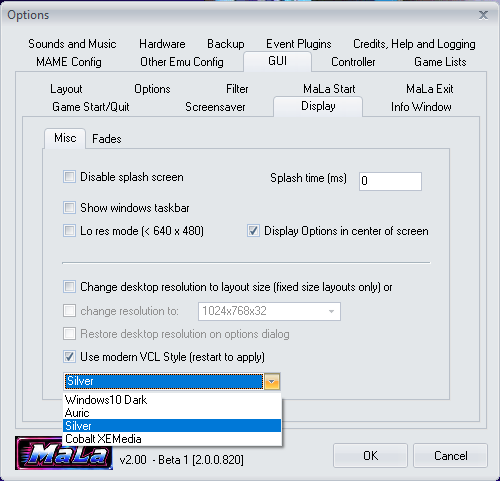
Options → GUI → Display → Misc: tick “Use modern VCL Style” and pick a style from the dropdown (restart to apply).
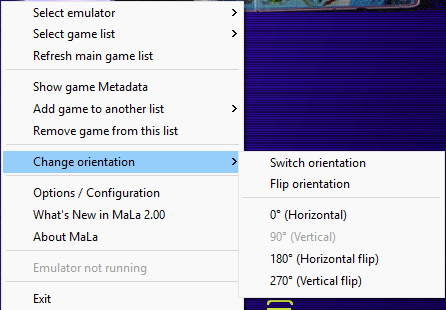
Right-click → Change orientation: choose 0°, 90°, 180° or 270° directly, or use Switch / Flip.
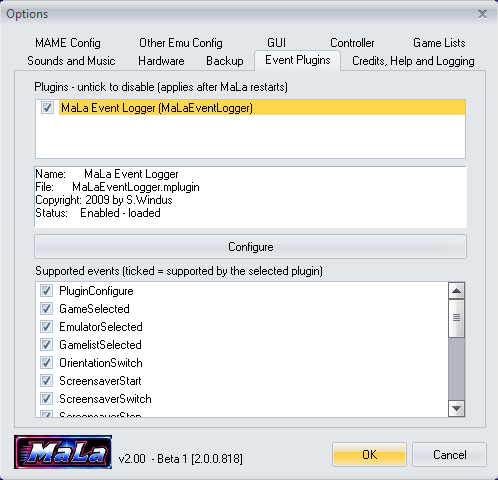
Options → Event Plugins: untick a plugin to disable it, and see which events each plugin supports.
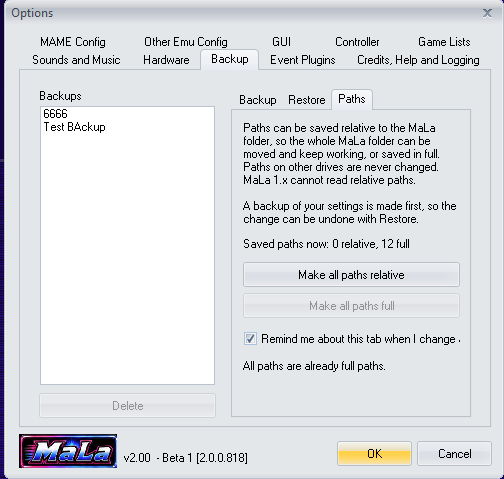
Options → Backup → Paths: choose whether MaLa saves its paths relative to the MaLa folder or in full. Your settings are backed up first, so the change can be undone.
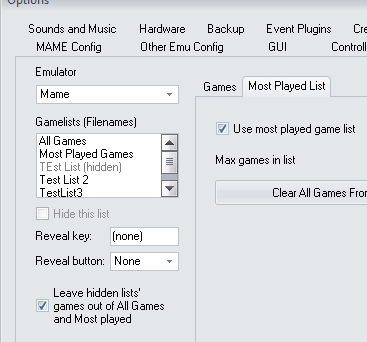
Options → Game Lists: hide a list, choose a reveal key or joystick button, and decide whether hidden lists’ games stay out of All Games and Most played. Hidden lists show greyed out here.
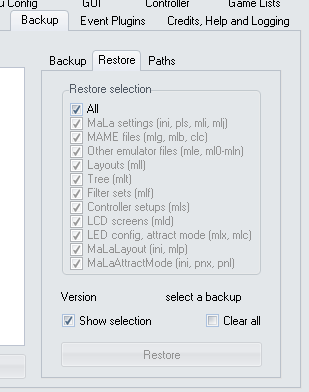
Options → Backup → Restore: pick exactly what to put back from a backup, from settings and MAME files to layouts, filters and LED configs.
Got an idea for MaLa? Add it to the MaLa 2.0+ - New Feature ideas thread on the BYOAC forum.